Laser Cut Sea War Ship Wall Art SVG
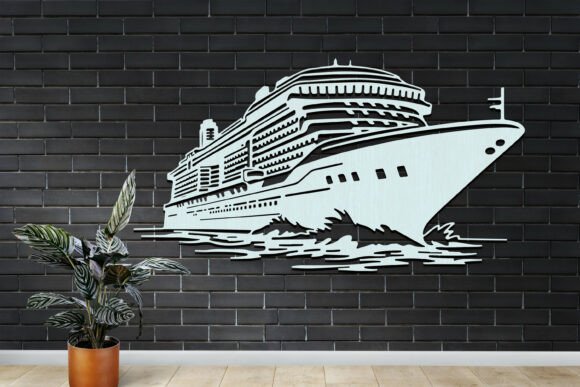
Transform your space with the dramatic depth and intricate detail of a stunning, multi-layered wall sculpture. The Laser Cut Sea War Ship Wall Art SVG provides a comprehensive digital toolkit for crafters and designers to create a breathtaking nautical centerpiece, capturing the majestic essence of historical maritime vessels with modern precision.
This versatile design asset is far more than a simple image. It’s a complete project file package engineered for compatibility and creative freedom. Upon downloading, you receive a zip file containing all the essential formats: AI, EPS, SVG, JPG, PNG, DXF, and DWG. This ensures seamless integration with virtually any cutting machine software, graphic design program, or CAD application you prefer, from Cricut Design Space and Silhouette Studio to Adobe Illustrator and CorelDRAW.
Unleash Your Creative Potential
The applications for this detailed sea war ship design are incredibly broad, making it a valuable addition to any design assets library. Its layered structure allows for dynamic shadowing and a true 3D effect when cut and assembled.
- Home Decor & Wall Art: Create a statement piece for a living room, study, or maritime-themed bedroom.
- Custom Signage: Design unique signs for seaside businesses, pubs, or nautical events.
- Educational Tools: Craft engaging historical displays or interactive models for classrooms.
- Personalized Gifts: Build a one-of-a-kind present for history buffs, naval enthusiasts, or model builders.
- Event Decor: Add a sophisticated touch to themed parties, weddings, or gallery exhibitions.
Simple Steps to Create Your Masterpiece
Using the file is a straightforward process designed for both beginners and experienced makers. To bring your Laser Cut Sea War Ship Wall Art SVG to life, follow these simple steps:
- Download the ZIP file to your computer and extract all the contained files.
- Upload the appropriate file format (like SVG or DXF) to your cutting machine’s software.
- Use the machine to cut each intricate layer from your chosen material, such as wood, acrylic, or cardstock.
- Once all layers are cut, carefully stack and assemble them in the correct order as indicated by the serial numbering to construct the final, stunning piece of art.
With these clear instructions, you can confidently create a professional-looking wall art piece that showcases impressive detail and craftsmanship. The design is optimized for clean cuts, ensuring crisp edges and a polished final product that elevates any interior design project.
Tips for Selecting and Using Your Design
When working with layered SVG designs, consider the material you intend to use. Thicker materials like 3mm MDF or plywood will create a more substantial, shadow-casting piece, while thinner media like cardstock can be used for layered greeting cards or framed prints. Always test cut a small section first to perfect your machine’s settings for speed and pressure.
Think about the color scheme. You can paint each layer individually before assembly for a vibrant, multi-toned effect, or use a single stain or paint for a classic, unified look. The design’s versatility allows it to fit into various decor styles, from rustic farmhouse to coastal chic or even modern minimalist when cut from sleek black acrylic.
Choosing a well-crafted digital design like this ensures your project starts on a strong foundation. It saves you countless hours of design time and guarantees a level of detail and accuracy that is difficult to achieve manually. Whether you’re crafting for personal enjoyment, creating items for sale, or developing unique branding elements for a nautical business, having a reliable, high-quality asset streamlines your workflow and enhances your creative output.